PA01: Turtle Drawing
Due by 11:00pm on Wednesday, February 5th, 2025
Objective: The objective of this assignment is for students to learn how to utilize and combine basic turtle graphic commands to produce a unique drawing. By the end of this assignment, students should be able to understand proper use of imports and master attributes of the turtle import.
1 Task
For this assignment, you will design a program that produces a creative drawing using turtle functions. Please do not draw just a simple polygon (i.e. one circle), we will not consider assignments with these submissions. However, you may use a combination of polygons and lines to build a bigger drawing such as a house or a landscape. Try to be creative!
You must match our file name, my_turtle.py, exactly. It is important to get into the habit of matching our filename exactly for future autograders! This will become important on future assignments so it can generate useful feedback to help you.
2 Instructions
- Open PyCharm IDE
- Create a new project for the course or for this specific assignment (if you haven’t already), e.g., your project name might be “pythonProject”.
- Right-click on a project and select new, then select python file.

- A “New Python file” dialog box will appear. Name your new file
my_turtle.py. Make sure “Python file” is highlighted. - Start coding your assignment inside this file!
Since this assignment is based on creativity, there is no right or wrong. Have fun!
Keep the following in mind as you write your code, as you will be graded on these aspects:
- Don’t forget your header at the top of your .py file (see section 3.1)
- Cite your resources clearly or state you did not use any
3 Submission and Collaboration Policy
3.1 Your Submission–Comment Header
Your .py file should contain the following information (header) at the top of your file:
# NAME: e.g. I. Lv. Sneks
# COMPUTING ID: e.g. ils3py@virginia.edu
# PA NUMBER and NAME: e.g. PA## - Name of the Assignment
# Resources used (if applicable):
For Resources, include URLs to any online resources where you studied or reviewed code that is specific to these problems, including any physical textbooks you referenced. Include any other resources you used here. Note on resources: Please feel free to refer to the lecture slides, demos, and in-class labs to complete this assignment (all located on Canvas).
Absolutely no collaboration with any fellow students (who are not current CS 1112 course TAs) is allowed. Your work must represent individual effort. You must write your own code: not just type it, but also compose it yourself as your own original work.
You must cite any and every source you consult, other than those explicitly provided by the course itself. If you work with, obtain or receive help from another source (Internet website, textbook, TA, tutor, online video, etc.), nothing should be copied or retyped into the submitted solution. References must be documented in a comment in the code on the assignment. Any copied work is an Honor Code violation.
3.2 Gradescope
3.2.1 Submitting on Gradescope
- Go to Gradescope (linked in Canvas course website)
- Click on PA01 – Turtle Drawing in the assignment list on Gradescope
- Upload your Python program as
my_turtle.py.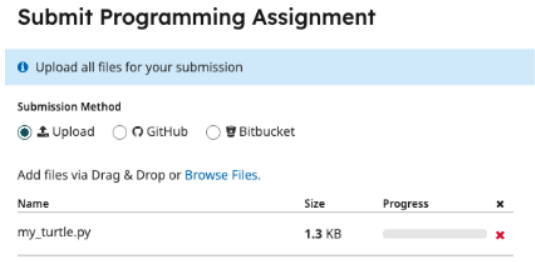
- Click Browse Files to upload a screenshot of your drawing that was produced by using the turtle library
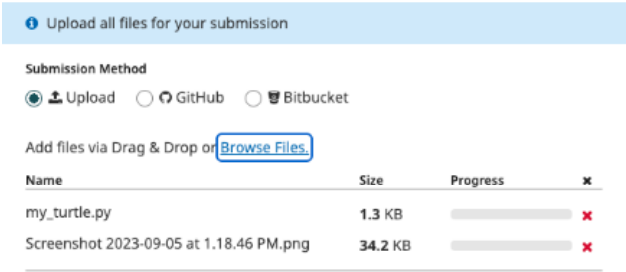
- Click the upload button at the bottom right corner to submit both files!
- Remember to include your name, computing ID, and resources in your comments!! (See section 3.1 of this document.)
- You should submit your code to Gradescope. If you are having trouble with your submission, you should double check the following common problems:
- Make sure you are only submitting two (2) files, a screenshot of the drawing and file called my_turtle.py exactly
- *This assignment will be graded by hand, and therefore will not have a Gradescope autograder. That is, you will not see a score as soon as you submit.
Note: If you face any difficulties or have questions, please reach out to the instructor or teaching assistants for assistance.